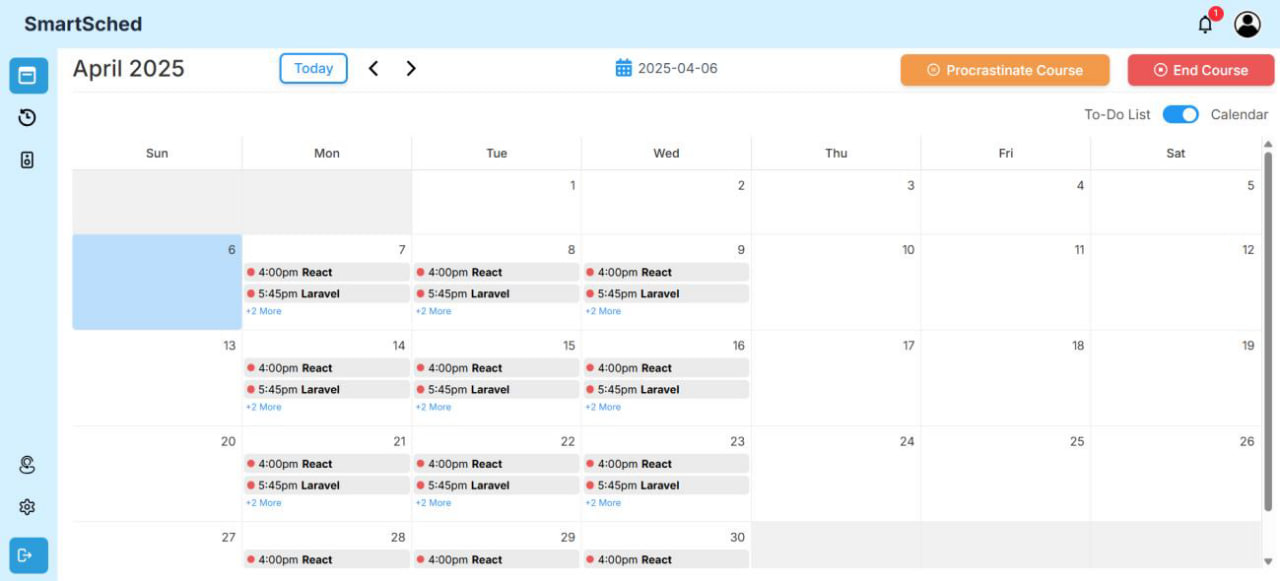
Balancing academic deadlines with personal time is a constant challenge for students, often leading to inconsistent study habits. SmartSched addresses this by combining the Google Gemini API with a React and Laravel stack to generate personalized study plans, integrated quizzes, and adaptive scheduling.
SmartSched: Architecting an AI-Powered Study Planner
Many students face difficulties managing their study hours effectively. Without structured roadmaps, self-study sessions often collapse into cramming or procrastination. While existing digital tools offer basic calendars or static templates, they rarely adapt to an individual student's real-time constraints, leaving a gap for a smarter scheduling assistant that actively keeps learners on track.
How SmartSched Works Under the Hood
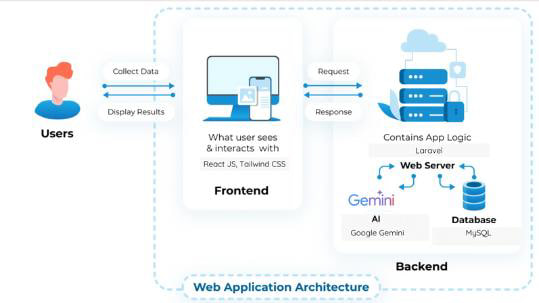
To build a responsive and scalable platform, the development team selected a decoupled architecture. The frontend uses React JS and Tailwind CSS for a modular, fast-loading user interface. The backend relies on Laravel, utilizing its Model-View-Controller pattern and Eloquent ORM to handle core application logic, database operations with MySQL, and secure authentication. To power the intelligent scheduling and custom quiz generation, the backend integrates with Google's Gemini API.
Key Features of the Platform
SmartSched moves beyond traditional static calendars by focusing on interactive features. When a user inputs their study preferences, available times, and target subjects, the Gemini API generates a tailored study roadmap. Once a lesson block is completed, the application generates short quizzes to test knowledge retention. Understanding that student schedules are highly dynamic, the platform also includes a procrastination feature with set time limits, allowing users to pause and reorganize their sessions without losing momentum.
System Workflows and Data Design
To ensure seamless interactions, the backend tracks user schedules, generator profiles, and completed roadmaps. When a student requests a schedule, the app processes the request, accesses the AI endpoint, saves the structural plan to the database, and renders it inside an interactive calendar view. This methodical design helps ensure that loading times for AI generation are kept within a practical four to five-second window, protecting the user experience.
Development Insights and Future Steps
Built over a twelve-week cycle using Agile Scrum methodologies, the team navigated various learning curves. Adapting to a new technology stack and coordinating collaboration across schedules were notable hurdles. The current iteration successfully implements authentication, roadmap scheduling, and quiz evaluation. Moving forward, future updates will explore multi-language support, deeper session tracking, and a native dark mode to further refine the learning experience.